

Information has always been a valuable resource and expensive to sell. Corporations that own online platforms make money by selling user data on ad networks. In any modern browser settings there is an option “Do not follow”, the user can disable the cookie file containing the data about the computer, enter the site using the “incognito” mode – but the web service will still continue to collect data. Use JavaScript to request information about hardware configuration, location, and other information. When responding to corporate requests for user data in any way, anti-detection browsers appeared. To build the software, it most often uses the Chromium engine and special modules that convert real data.
How Anti-Detection Browsers Work
Each computer in the network has its own unique digital fingerprint – fingerprint, it consists of computer configuration data, BIOS firmware version, operating system, browser, mac-address, IP, video card model, screen resolution, fonts used. Dozens of settings allow for countless combinations, making it almost impossible for two computers to be on the same network with the same digital fingerprint.
Anti-detection browsers replace the actual fingerprint with a fake, a process called forgery. A new digital fingerprint is created using the manager – all computer settings can be changed by selecting the desired configuration from the list. Depending on the type of browser, users may be offered the ability to upload their own configuration using ready-made templates or cookies.
Scope of Underdeket browsers
Initially, anti-detection browsers focused on a wide range of users, but soon found their target audience willing to pay for functionality and additional options – VPN deployment, automatic proxy switching.
Fingerprinting is a data collection process that prevents the work of advertising and traffic specialists. Most online sites do not provide multiple accounts. Joint management of one profile by several employees is blocked on some sites, but can be easily implemented through an anti-detection browser.
Who will need it
- Online sellers sell on OLX, Amazon, Ebay.
- Webmasters working with affiliate programs.
- SMM and SEO specialists.
- Arbitrators.
- Gamers.
Social cheating operations, emailing, mass mailbox registration, and other activities related to possible blocking are carried out using browser antidetect.
Step-by-step instructions
Today more than two dozen browsers offer fraudulent services. Since their functionality is similar, let’s consider the basic parameters using the example of Nofingerprinting software. The proposed set of add-ons allows you to quickly customize your digital fingerprint. The only difference between Nofingerprinting and other browsers is that each module is sold separately, competitors usually combine all the features listed below into one toolkit.
Register on the site, download the proposed software and browser, open it, install it. Buy a license. Run the program, in the menu that opens, select different options.
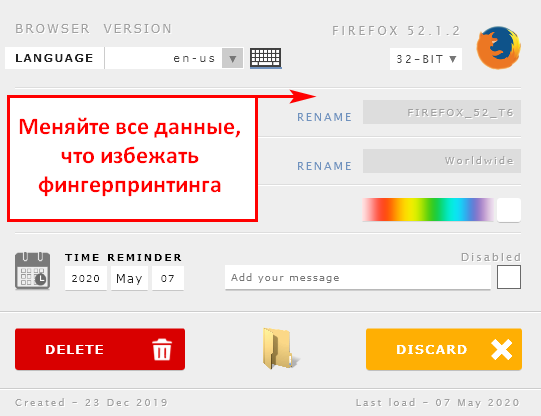
Change browser version, color palette, language, computer name, time zone, date. Go to the next module.
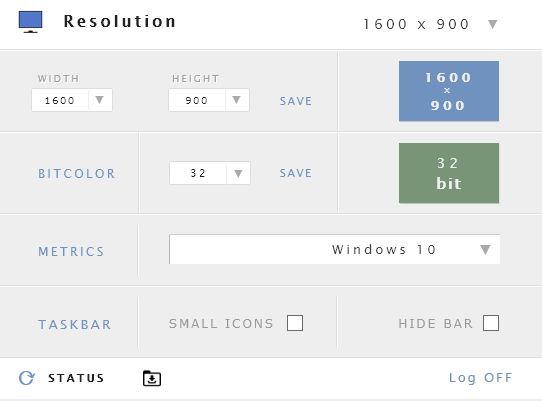
Change operating system color, resolution, version.
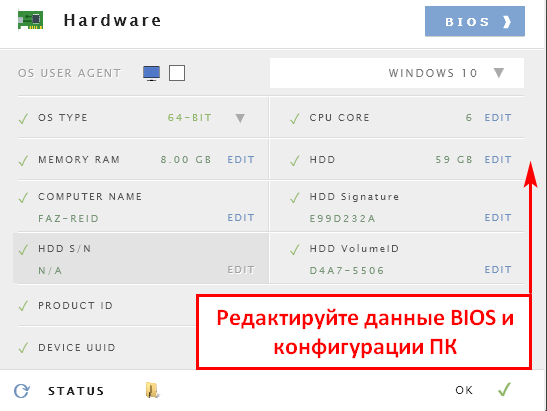
In the new tab you can change the bit depth of the OS, the size of the RAM, the HDD, the hardware ID number.
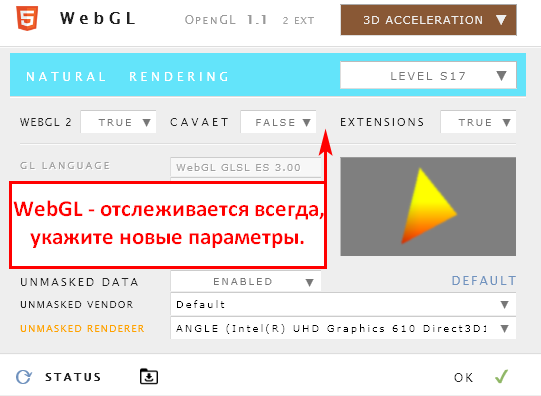
The browser always transmits information about the WbGL – change the data to make the digital fingerprint unique.
All anti-detection browsers use the same principle to create a new digital fingerprint. The manager is built-in as a plugin in the browser, which is represented by the program or can be in the form of a web menu in a personal account.
source: gembla


0 Comments
Any Queries , You May Ask